
Screenshots
About photo lock screen
Secure your Android device with a photo lock screen that combines powerful passcode protection with personalized style. This lock screen app lets you set a custom passcode using your favorite photos, transforming security into a beautiful daily experience.
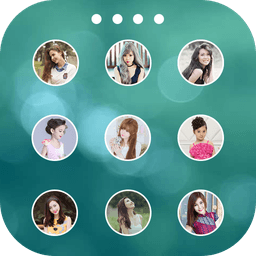
Take full control of your lock screen's appearance by uploading images directly from your gallery. Choose from multiple passcode styles—classic, photo, bubble, heart, and more—to match your personality. Customize the shape of your unlock buttons with hearts, stars, diamonds, apples, circles, and other fun designs. You can crop and resize any photo to fit perfectly, ensuring your lock screen looks exactly as you envision it.
Personalize every element of your device's security interface. Set a custom background wallpaper, add a passcode avatar featuring your loved ones, family, or friends, and display the current date on your lock screen. With access to multiple high-definition wallpapers and over 50 language options, this app adapts to your preferences and location.
The simple slide-to-unlock gesture makes accessing your phone intuitive and fast, while the robust security ensures your device stays protected. Whether you're using a phone or tablet, this application works seamlessly across devices. The intuitive design means setup takes seconds—no complicated menus or confusing settings to navigate.
Elevate your device security with a photo lock screen that doesn't compromise on style. Transform the moment you unlock your phone into something personal and memorable every single time.
Pros & Cons
Pros
- Highly customizable lock screen with photos, shapes, and multiple passcode styles
- Simple slide-to-unlock gesture makes unlocking intuitive and fast
- Supports 50+ languages and works on both phones and tablets
- Quick setup with minimal configuration needed to get started
Cons
- Replaces your device's native lock screen, may conflict with system security features
- Custom passcode patterns could be slower or less secure than standard PIN/biometric methods
- Stores personal photos as lock screen data, raising privacy considerations
- No mention of offline functionality; relies on app remaining active and updated
Related Apps

HWiNFO
Hardware monitoring for Windows—track CPU temp, GPU load, fan speed, voltage in real time.

TransMac
Read Mac drives and DMG files on Windows. Access APFS/HFS+ storage and create disk images.

Advanced SystemCare Free
System optimization tool: clean, repair, and secure your PC. Remove malware, fix errors, and boost performance.

Display Driver Uninstaller (DDU)
Driver uninstaller for GPU and audio — removes residual files for clean Windows updates

Glary Utilities
PC maintenance and optimization suite — clean, repair, and speed up your Windows computer in one action.

Universal ADB Drivers
ADB drivers for Android: Connect any smartphone to Windows PC without manufacturer software.
Latest Articles

Best AI admin task automation apps for desktop in 2026 (we tested 7)
Jul 11, 2026

Best AI coding tutor apps for desktop in 2026 (we tested 7)
Jul 11, 2026

Best apps for the *arr media stack on desktop in 2026 (we tested 7)
Jul 11, 2026

Best classic Doom source port apps for desktop in 2026 (we tested 7)
Jul 11, 2026

Best FFXIV companion apps for desktop in 2026 (we tested 7)
Jul 11, 2026